
Wi-Fi 7: The Next Generation
The innovative 802.11be standard, also known as Wi-Fi 7, offers higher data throughput, better transmission and lower latency, which represents a significant advance for consumers and businesses.Wi-Fi Technology
Wi-Fi 7: The new Standard 802.11be
Get ready for the latest evolution in wireless connectivity: Wi-Fi 7 is here, offering impressive speeds, minimal latency and consistent reliability. The Wi-Fi CERTIFIED 7 program, launched by the Wi-Fi Alliance in January 2024, promises to revolutionize our connectivity experiences whether we are at home, in the office or on the move. While Wi-Fi 6/6E have already made great strides, Wi-Fi 7 will push the boundaries even further.
The new standard, Wi-Fi 7, is primarily aimed at improving:
Data throughput
Transmission performance
Stability as well as latency
Wi-Fi 7 builds on the foundations already laid with Wi-Fi 6E. These improvements promise benefits for both private users and companies that rely on fast data traffic in their internal networks.
In the following chart, you can see the development of Wi-Fi over the past years through 2024.
Wi-Fi: Theoretical PHY Data Rates from 1997 to 2024
Selected Wi-Fi milestones on a logarithmic scale.
PHY denotes the physical layer. The Wi-Fi 7 rate assumes a single 320 MHz link in the 6 GHz band, eight spatial streams and 4096-QAM. Actual application throughput is lower.
Wi-Fi: Theoretical PHY Data Rates from 1997 to 2024
Selected Wi-Fi milestones on a logarithmic scale.
PHY denotes the physical layer. The Wi-Fi 7 rate assumes a single 320 MHz link in the 6 GHz band, eight spatial streams and 4096-QAM. Actual application throughput is lower.

Updates
From Wi-Fi 6 to Wi-Fi 7
Like Wi-Fi 6E, Wi-Fi 7, officially IEEE 802.11be with the designation "Extremely High Throughput (EHT)", uses the 2.4 GHz, 5 GHz and 6 GHz bands. The 6 GHz extension was introduced with Wi-Fi 6E. Wi-Fi 7 increases the maximum channel width from 160 MHz to 320 MHz in the 6 GHz band, where regional regulations permit this operation.
With a 320 MHz channel, eight spatial streams and 4096-QAM, the theoretical single-link PHY rate reaches approximately 23 Gbit/s, compared with 9.6 Gbit/s for Wi-Fi 6. These are calculated physical-layer rates, not measured application throughput. Actual speeds depend on device capabilities, interference, network load and the deployment environment.
Wi-Fi 7 Key Features
Bandwidth
Channel width increases from 160 MHz to 320 MHz in the 6 GHz band, where permitted
4K QAM Modulation
4096-QAM carries 20% more bits per symbol than 1024-QAM
Multi-link Operation (MLO)
Multiple links between a compatible client and access point improve performance
How is the higher Data Rate achieved?
Wi-Fi 7 improves data rates through wider channels, higher-order modulation and multi-link operation:
Firstly, the maximum channel width increases from 160 MHz to 320 MHz in the 6 GHz band, where permitted.
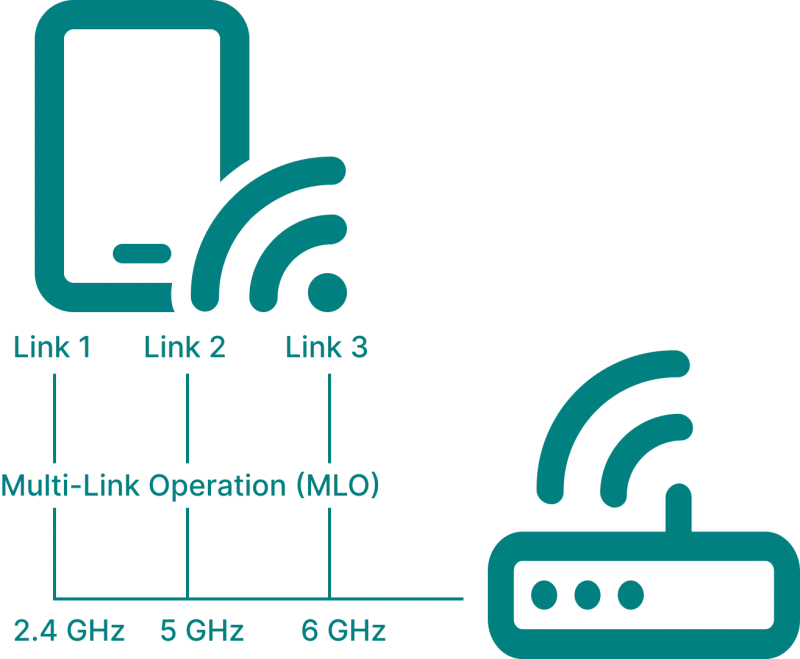
Multi-link Operation (MLO) allows a compatible client and access point to use multiple links. Depending on the operating mode, this can increase aggregate throughput or reduce latency.
Higher-order modulation, from 1024-QAM (Quadrature Amplitude Modulation) to 4096-QAM, carries 20% more bits per symbol under equivalent conditions.
The single-link maximum assumes eight spatial streams. Device capabilities and channel conditions determine which features and data rates are available in a particular deployment.
Latency, Reliability and Security
Multi-link operation (MLO) enables a compatible client and access point to establish multiple radio links across supported frequency bands. Depending on the operating mode and channel conditions, these links can improve throughput, reliability and latency. This feature is particularly useful where low latency matters, including applications that require near real-time input and output.
Wi-Fi security relies on mechanisms such as WPA3 authentication and encryption, rather than on channel width. Effective protection also depends on secure configuration, strong credentials and maintained firmware. These measures are particularly important in corporate networks where sensitive data is transmitted.
Technical Innovations
From Wi-Fi 5 to Wi-Fi 7
Wi-Fi 5
| Frequency band | 5 GHz |
|---|---|
| Standard | 802.11ac |
| Max. PHY rate | ~6.9 Gbit/s |
| Access / multi-link | OFDM |
| Max. spatial streams | Up to 8 |
| Modulation | 256-QAM |
| Target Wake Time (TWT) | No |
| BSS Coloring | No |
| WPA3 support | Device-dependent |
Wi-Fi 6
| Frequency band | 2.4 GHz, 5 GHz |
|---|---|
| Standard | 802.11ax |
| Max. PHY rate | 9.6 Gbit/s |
| Access / multi-link | OFDMA |
| Max. spatial streams | Up to 8 |
| Modulation | 1024-QAM |
| Target Wake Time (TWT) | Yes |
| BSS Coloring | Yes |
| WPA3 support | Yes |
Wi-Fi 6E
| Frequency band | 2.4 GHz, 5 GHz, 6 GHz |
|---|---|
| Standard | 802.11ax |
| Max. PHY rate | 9.6 Gbit/s |
| Access / multi-link | OFDMA |
| Max. spatial streams | Up to 8 |
| Modulation | 1024-QAM |
| Target Wake Time (TWT) | Yes |
| BSS Coloring | Yes |
| WPA3 support | Yes |
Wi-Fi 7
| Frequency band | 2.4 GHz, 5 GHz, 6 GHz |
|---|---|
| Standard | 802.11be |
| Max. PHY rate | ~23 Gbit/s |
| Access / multi-link | OFDMA, MLO |
| Max. spatial streams | Up to 8 |
| Modulation | 4096-QAM |
| Target Wake Time (TWT) | Yes |
| BSS Coloring | Yes |
| WPA3 support | Yes |
| Parameter | Wi-Fi 5 | Wi-Fi 6 | Wi-Fi 6E | Wi-Fi 7 |
|---|---|---|---|---|
| Frequency band | 5 GHz | 2.4 GHz, 5 GHz | 2.4 GHz, 5 GHz, 6 GHz |
2.4 GHz, 5 GHz, 6 GHz |
| Standard | 802.11ac | 802.11ax | 802.11ax | 802.11be |
| Max. PHY rate | ~6.9 Gbit/s | 9.6 Gbit/s | 9.6 Gbit/s | ~23 Gbit/s |
| Access / multi-link | OFDM | OFDMA | OFDMA | OFDMA, MLO |
| Max. spatial streams | Up to 8 | Up to 8 | Up to 8 | Up to 8 |
| Modulation | 256-QAM | 1024-QAM | 1024-QAM | 4096-QAM |
| Target Wake Time (TWT) | No | Yes | Yes | Yes |
| BSS Coloring | No | Yes | Yes | Yes |
| WPA3 support | Device-dependent | Yes | Yes | Yes |
PHY (physical-layer) rates are theoretical maxima per link, not application throughput. Wi-Fi 5, Wi-Fi 6 and Wi-Fi 6E assume 160 MHz and eight spatial streams; Wi-Fi 7 assumes 320 MHz, eight spatial streams and 4096-QAM. Spatial streams are parallel data streams, not antenna counts. MLO combines multiple links; its aggregate rate is a separate metric. WPA3 availability depends on device hardware, software and configuration.
Wi-Fi 7: Bandwidth and Channel Allocation
Illustrative channel allocation across the full 5925–7125 MHz band. Available spectrum, channel widths and operating conditions depend on the target market and device class.
Wi-Fi 7: Bandwidth and Channel Allocation
Illustrative channel allocation across the full 5925–7125 MHz band. Available spectrum, channel widths and operating conditions depend on the target market and device class.
Practical Advantages of Switching to Wi-Fi 7
The theoretical advantages of the new Wi-Fi standard manifest themselves in practice in a variety of ways and offer solutions for different application scenarios:
By using the 6 GHz band introduced with Wi-Fi 6E, environments with high utilization benefit in particular. If the 2.4 GHz and 5.0 GHz frequency bands are overused, Wi-Fi 7 can use additional spectrum where regional rules and device capabilities permit. This can reduce contention and improve transmission performance. The new standard can provide considerable relief, particularly in public Wi-Fi networks, densely populated building complexes and companies with many employees.
The high data rate opens up new areas of application, including video streaming in resolutions from 4K to 8K, augmented and virtual reality applications, latency-critical cloud gaming platforms and similar areas of use. Industry and remote applications in areas such as medicine and diagnostics also benefit from this development.
Multi-link operation is particularly beneficial in environments where a large number of end devices are connected to one or a few access points. MLO lets compatible clients and access points use multiple links, helping distribute traffic and reduce delays when channel conditions allow. Typical areas of application are large office complexes where only a few routers are available.
If you see a need for improvements in the areas of data rate, latency, security or signal quality, Wi-Fi 7 could provide a suitable option, depending on device capabilities and deployment conditions.
One Disadvantage: Shorter Range in the 6 GHz Band
As with Wi-Fi 6E, the 6 GHz band offers additional capacity, but higher frequencies generally mean a shorter range. To ensure maximum signal strength, access points and end devices should therefore not be placed too far apart.
In addition, walls and other obstacles can further impair signal quality. Before making a complete switch to Wi-Fi 7, it is therefore advisable to test whether the planned hardware configuration works effectively under the existing conditions.
Which Devices Support Wi-Fi 7?
Routers and repeaters, smartphones, laptops, IoT devices, smart home tech - all need the appropriate hardware to fully benefit from the new Wi-Fi 7 features - but backwards compatibility is maintained.
Router and Repeater
Asus ROG Rapture GT-BE98
Netgear RS700S
TP-Link Archer BE800
Smartphones
Samsung Galaxy S24 Ultra
Xiaomi 13T Pro
Honor Magic5 Pro
Laptops
HP Spectre x360 14 (Wi-Fi 7 configurations)
MSI Titan 18 HX A14V
These examples illustrate devices with Wi-Fi 7 support. Available bands and features depend on the exact model, region, firmware and WLAN configuration. Over time, more and more devices will be equipped with Wi-Fi 7 as all major chip manufacturers, including Broadcom, Qualcomm and Intel, offer chipsets that support Wi-Fi 7. (as of March/2024)
Ensure Compatibility with Wi-Fi 7
Like its predecessors, Wi-Fi 7 remains fully backwards compatible. This means that devices that support earlier generations can connect to Wi-Fi 7 routers and access points using mutually supported bands and security settings. Data transfer between other Wi-Fi 7 devices is also no problem.
However, older devices will not be able to benefit from the new functions of the standard. For example, a notebook that only supports Wi-Fi 5 will still use Wi-Fi 5 capabilities and will not gain Wi-Fi 7-only features after connecting to a Wi-Fi 7 router.
Wi-Fi Device Testing with DFS
Dynamic Frequency Selection (DFS) test in our laboratory with the Rohde & Schwarz TS8997 wireless measurement system. In certain 5 GHz bands, DFS protects radar systems from interference. Our demonstration shows how a primary Wi-Fi device detects radar signals and selects channels. Benefit from our know-how and modern laboratory equipment and contact us for more information.
WLAN Certification
Bring your Wi-Fi Product to Market with Us
To ensure that your WLAN products are up to standard and can provide a secure and reliable service, we perform our testing services in our accredited laboratory with state-of-the-art equipment. We offer Wi-Fi testing and support transparent certification planning according to the requirements of your target markets.
Learn more about our WLAN testing and certification services.
CE (Europe)
Ready for the European Market
FCC (USA)
Handling the US Type Approval procedure
ISED (Canada)
Your way to the Canadian Market
MIC (Japan)
Get your Type Approval for Japan
Let's get in Touch
The experts at IB-Lenhardt AG and IBL-Lab GmbH are always there for you. Just contact us!Frequently Asked Questions
All you need to know about Wi-Fi 7
- What do the abbreviations mean?
-
OFDMA: Orthogonal Frequency-Division Multiple Access. Divides channels into small frequency allocations, enabling parallel transmission of small data packets, boosting network performance.
TWT: Target Wake Time. Lets devices schedule activity with the access point and sleep between exchanges, helping reduce power consumption.
WPA3: Wi-Fi Protected Access Version 3. Latest Wi-Fi security standard, introduced in 2018, enhancing authentication procedures, particularly against dictionary attacks.
U-NII: U-NII (Unlicensed National Information Infrastructure) is a designation by the US Federal Communications Commission (FCC) for license-free radio frequency bands.
- In which areas does Wi-Fi 7 already offer concrete advantages?
-
With compatible hardware and suitable channel conditions, Wi-Fi 7 can improve data rates, latency and reliability. MLO allows a client and access point to use multiple links. Security and privacy depend on mechanisms such as WPA3 and secure configuration; wider channels do not themselves provide encryption.
- Which devices need to be updated to use Wi-Fi 7?
-
To use Wi-Fi 7 features, both the access point and the client must support the relevant capabilities. Devices negotiate a mutually supported operating mode. For example, a Wi-Fi 5 notebook can connect to a Wi-Fi 7 router on a shared band using compatible security settings, but it will continue to use Wi-Fi 5 capabilities.
- What are the disadvantages of Wi-Fi 7?
-
Wi-Fi 7 may require investment in compatible hardware and network infrastructure. Using the 6 GHz band also requires suitable coverage planning because higher frequencies are more affected by distance and obstacles. Available spectrum and supported features vary by target market and device configuration, as they do for Wi-Fi 6E.
- What comes after Wi-Fi 7?
-
Wi-Fi 8 is being developed through the IEEE 802.11bn project, with a focus on Ultra High Reliability. The project targets improvements in throughput under challenging conditions, latency and packet loss in the 2.4 GHz, 5 GHz and 6 GHz bands. Its specifications are still being developed, so final features and availability should not be treated as settled.

Contact us
Unlock the Power of Wi-Fi 7 for Your Business
The Wi-Fi CERTIFIED 7 label is part of the Wi-Fi Alliance interoperability certification program. Regulatory market-access requirements depend on the target markets and the radio capabilities of the product.
In our laboratory, we perform applicable radio and compliance tests for your Wi-Fi hardware. We support test planning and the certification process for your target markets. By contacting us early, you can identify the relevant requirements and plan the necessary steps for your product.